VERSION HISTORY/CHANGELOG
Rev. | Changelog | Author/Editor | Date |
1.0 | Release Version | Ryan Ning | 2025/09/01 |
OVERVIEW
This document provides information on the integration of Rolls S48-100LFP STACK-LV – S48-800LFP STACK-LV ESS with Sol-Ark Hybrid Inverters via CAN bus & RS-485. The integration covers, but is not limited to, the following components.
Sol-Ark Reference Docs: | Rolls LFP STACK-LV Reference Documents: |
|
Refer to www.rollsbattery.com for the most recent version of these documents.
The following guide references instruction from the inverter manufacturer. Always verify these settings against current versions of the manufacturer’s documentation and any additional settings necessary for other system components. Rolls Battery accepts no responsibility for any damage or issues that may occur from the use of this material.
CERTIFICATION INFORMATION
UL 1973 ComplianceThis device complies with ANSI/CAN/UL 1973:2022 Ed.3 Test Organization: Intertek Report Number: 241213059GZC-001 Date Issued: 4 June 2025 | |
UL 9540 ComplianceThis device complies with UL 9540:2023 Ed.3 Test Organization: Intertek Report Number: 241212095GZU-001 Date Issued: 9 July 2025 |
|
UL 9540A ComplianceThis device complies with ANSI/CAN/UL 9540A:2025 Ed.5 Test Organization: Intertek Report Number: 241212104GZC-001 Date Issued: 6 July 2025 |
|



BATTERY CURRENT OPERATING LIMITS
Maximum Battery and ESS Operating Limits
Different system configurations will change the acceptable operating limits. The Energy Storage System (ESS) should not be operated outside these operating limits. The Battery Management System (BMS) will open its internal switch and disconnect the battery in charge and/or discharge if any of these limits are exceeded. Repeated operation outside of posted limits will void your warranty.
CONFIGURATION MAXIMUM CURRENT REFERENCE | ||||||||
MODEL | S48-100LFP STACK-LV | S48-200LFP STACK-LV | S48-300LFP STACK-LV | S48-400LFP STACK-LV | S48-500LFP STACK-LV | S48-600LFP STACK-LV | S48-700LFP STACK-LV | S48-800LFP STACK-LV |
Modules | 1 | 2 | 3 | 4 | 5 | 6 | 7 | 8 |
Capacity (Ah) | 100 | 200 | 300 | 400 | 500 | 600 | 700 | 800 |
400A Busbar Configuration (Dual Positive & Dual Negative Busbars) | ||||||||
Max Charging Current | 100A | 160A | 240A | 320A | 400A | 400A | 400A | 400A |
Max Discharging Current | 100A | 160A | 240A | 320A | 400A | 400A | 400A | 400A |
C-Rate | 1.0C | 0.80C | 0.80C | 0.80C | 0.80C | 0.67C | 0.57C | 0.50C |
Note: Intentional bypassing of a BMS to operate a battery outside its maximum and minimum limits voids warranty and may lead to safety concerns. Refer to the Manual and Label for a full list of operating limits.
Minimum Battery Capacity – Sol-Ark
Using large solar arrays with ESS that are too small may exceed the operating limits of the ESS which would potentially trigger BMS over-current protection. Battery capacity must be sized to accommodate the maximum charge current of the system, or the charging devices must be adjusted to limit charge output below the operating limit of the installed batteries. This value is determined by summing the charge capacities of all inverter/chargers and solar charge controllers in the system. Additionally, the ESS must be sized with a peak current limit that supports the surge requirements demanded by the DC loads (including inverter). Ensure that the sum of peak currents of all devices on the DC bus is less than or equal to the sum of the ESS peak current values.
Model | Peak Discharge Current (DC) | Cont. Charge/Discharge Current (DC) | Single Phase Minimum |
144 A (10s) | 120 A | S48-200LFP STACK-LV | |
144 A (10s) | 120 A | S48-200LFP STACK-LV | |
222 A (10s) | 185 A | S48-300LFP STACK-LV | |
222 A (10s) | 185 A | S48-300LFP STACK-LV | |
330 A (10s) | 275 A | S48-500LFP STACK-LV |
ROLLS S48-100LFP STACK-LV CLOSED LOOP INTEGRATION WITH SOL-ARK EQUIPMENT
NOTE: Before proceeding, please ensure the S48-100LFP STACK-LV - S48-800LFP STACK-LV internal physical connection steps have been followed as per the S48-100LFP STACK-LV Battery Installation Guide above.
This guide outlines the setup process to connect Rolls S48-100LFP STACK-LV batter(ies) with the Sol-Ark 5K-1P-N inverter, following Sol-Ark Installation Guide and User Manual (V1.3).
The following steps are physically performed on the system devices or related to their interconnectivity.
- Activate the BMS in each S48-100LFP STACK-LV batter(ies) by pressing the on/off button. The screen and RUN light will be on.
- Ensure all S48-100LFP STACK-LV batteries are properly interconnected via Link in/out ports and set up properly for DIP switch addresses before connecting the external CAN bus communication connections.
- Refer to Appendix B in S48-100LFP STACK-LV Battery Installation Guide. Connect the batter MODULE 1 CAN port to the Sol-ark inverter BMS 485/CAN port as follows:
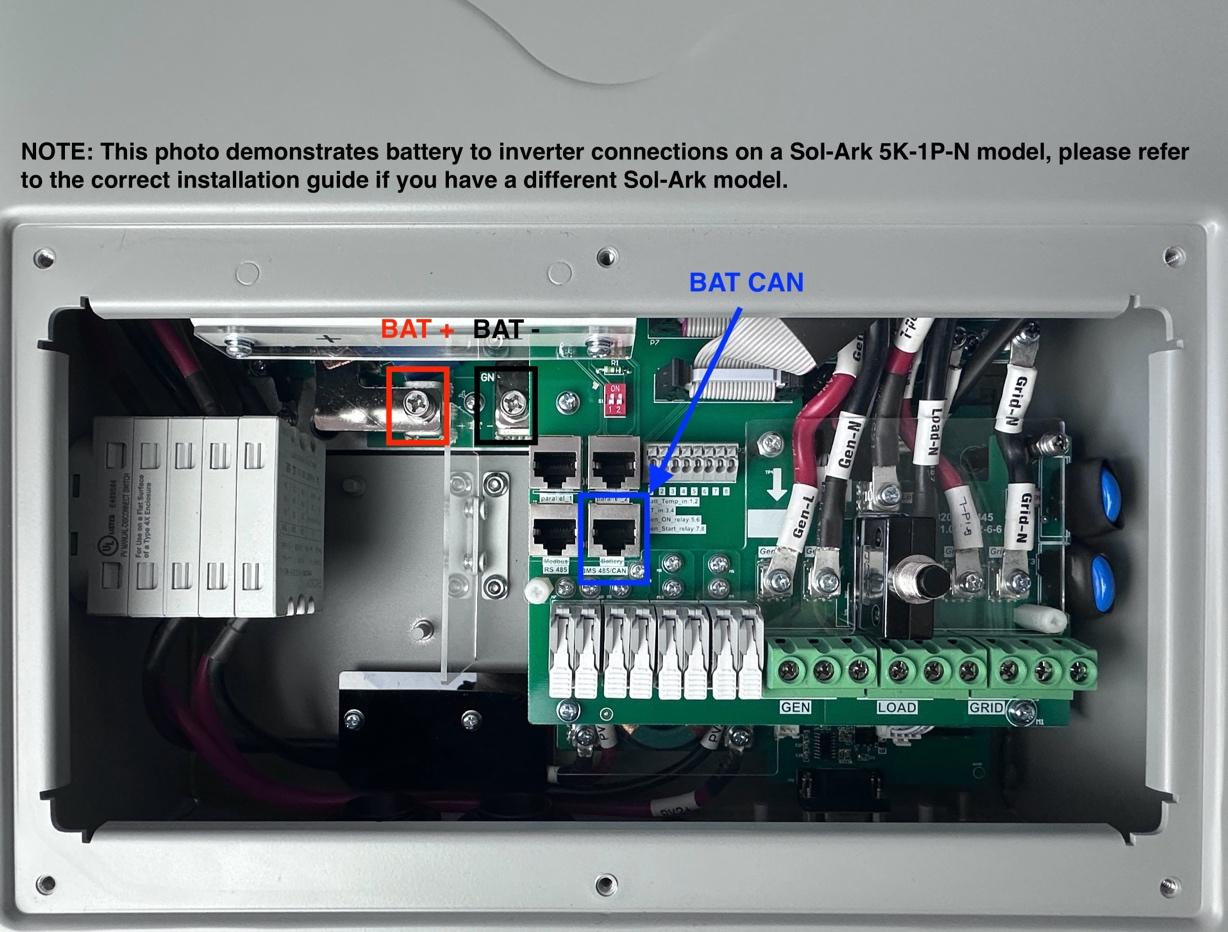
NOTE: Sol-Ark 5K-1P-N model shown for reference. For other models, please refer to the applicable Sol-Ark installation guide.
NOTE: The EXTERNAL COMM CABLE supplied with the LFP STACK BASE+TOP ASSEMBLY is NOT directly compatible with Sol-Ark inverters as the RJ45 connector pin positions vary. For compatibility with Sol-Ark inverters, the cable may be cut and re-assembly with the RJ45 connector pin repositioned as referenced in CAN COMMUNICATION below.
The following setup steps are performed on the display of the Sol-Ark 5K-1P-N device:
Turn on the Sol-Ark Device by push the ON/OFF button in the side→ Go to Device Settings on the main screen → Select Batt Setup Page.
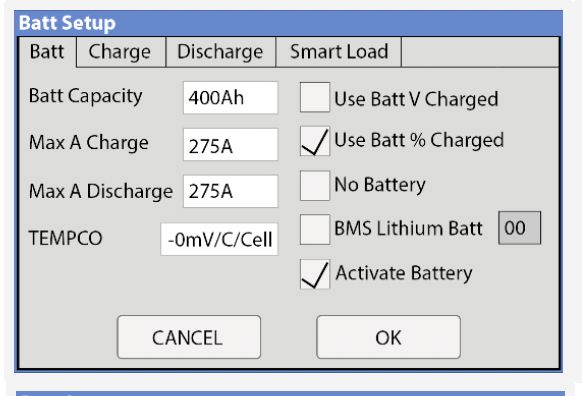
On the Batt tab: Enter Batt Capacity, Max A Charge, Max A Discharge values based on the ESS model listed in Maximum Battery and ESS Operating Limits. (Example shown is 400Ah)
Check Use Batt % Charged, BMS Lithium Batt 00 (ensure default value of 00 remains selected), and Activate Battery as shown above.
NOTE: If Use Batt V Charged is checked, this will be overwritten to Use Batt % Charged by the BMS when completing closed loop communication.
Verify inputs on this page.
Click OK to register. You will then be redirected to the Settings Page.
Select Battery Setup → Go to Charge tab
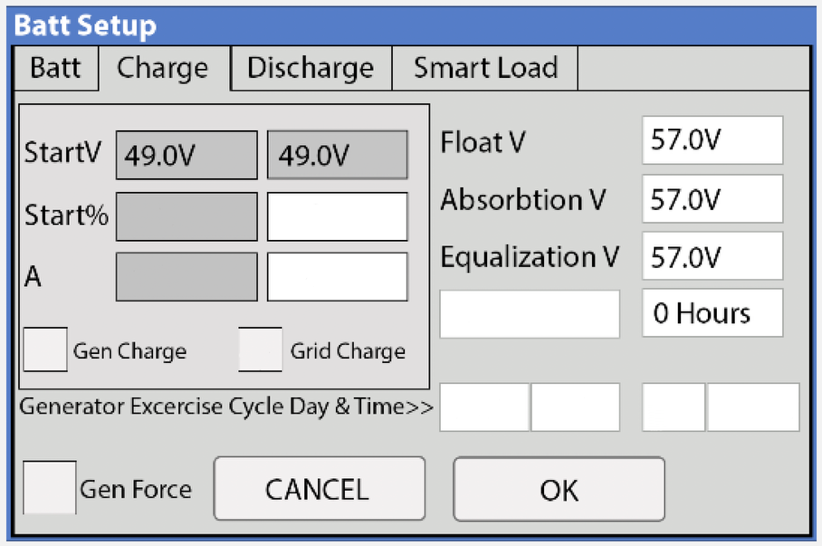
Check Grid Charge
Enter the battery Max Charging Current Value (See BATTERY CURRENT OPERATING LIMITS) based on your ESS model in Amps.
Enter 57.0 V for Float V, Absorption V, and Equalization V as shown above.
Enter 0 Hours to turn off the Equalization setting as this is not applicable for lithium batteries.
NOTE: These are boundary conditions. In closed loop communication the BMS will control these values during operation.
If you wish to use a generator to charge the battery, check Gen Charge and input the Start% as the SOC setpoint to initiate the generator. Preferred Generator Exercise Cycle Day & Time may also be entered. Refer to the inverter manual for recommendations.
Verify inputs on this page.
Click OK to register. You will be redirect to the Setting Page.
Select Batt Setup → Go to the Discharge tab
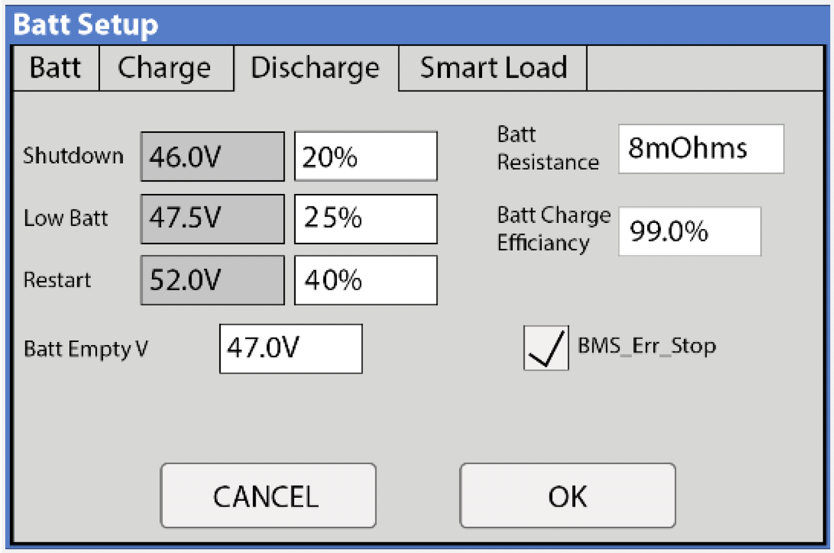
For Grid-tied Systems:
Shutdown: Battery voltage or % at which the inverter will shut down to protect the battery from an over discharge situation.
Rolls recommends 20% for best cycle life. A value as low as 0% may be entered for extreme conditions.
Low Batt: Low battery voltage or % (battery symbol on the home screen will turn yellow. Stopping point for TOU.
Rolls recommends 25%.
Restart: Battery voltage or % at which AC output will resume conversion DC to AC after reaching “shutdown” voltage.
Rolls recommends 40%. You shall enter a lower number under extreme conditions.
Battery Empty V: Sets the empty voltage and associates this voltage to 0% charge. This value determines the lowest % SOC limit.
Enter 44.6V
Check BMS_Err_Stop as shown above, this will enable inverter to fault on the loss of battery communications.
Click OK to register. You will then be redirected to the Settings Page.
For Off-Grid Systems:
To ensure reliable power availability and protect the battery from constant deep discharge in situations where charging may be delayed or insufficient, a more conservative SOC limit is required as follows:
Shutdown: Battery voltage or % at which the inverter will shut down to protect the battery from an over discharge situation.
Rolls recommends 20% for best cycle life. A value as low as 0% may be entered for extreme conditions or to compensate for extended periods with (for example) limited solar resource but should be avoided by proper system sizing.
Low Batt: Low battery voltage or % (battery symbol on the home screen will turn yellow. Stopping point for TOU.
Rolls recommends 25%
Restart: Battery voltage or % at which AC output will resume conversion DC to AC after reaching “shutdown” voltage.
Rolls recommends 40%. You shall enter a lower number under extreme conditions. However, please read the inverter manual before making such a change.
Enter Battery Empty V: Sets the empty voltage and associates this voltage to 0% charge. This value determines the lowest % SOC limit.
Enter 44.6V
Check BMS_Err_Stop as shown above, this will enable inverter to fault on the loss of battery communications.
Click OK to register. You will then be redirected to the Settings Page.
To confirm a successful connection:
Select Li-Batt info
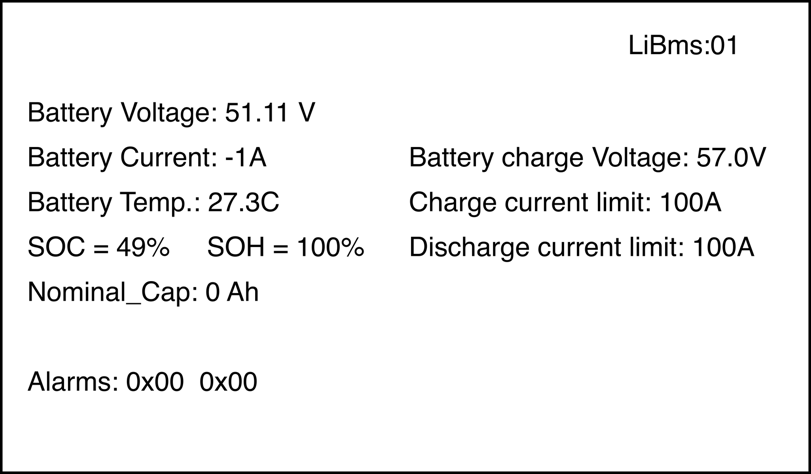
Note: If you do not see Battey Status information, please check the BMS communication connection and CAN bus port pinout as outlined in CAN COMMUNICATION section below.
- Check the battery status information including Battery Voltage, Battery Temp, and Discharge current limit.
- Check Battery Alarms information. The Sol-Ark display should note 0x00 0x00 for no alarm status from the BMS.
- Click Esc to return until the main screen.
The inverter setup process is now complete.
CAN COMMUNICATION
The S48-100LFP STACK-LV CAN bus port pinout is shown below.
Communication Standard | Baud Rate |
CAN | 500k Standard |
Plug Pin | Description |
|
1-6 | NC | |
7 | Can-H | |
8 | Can-L |
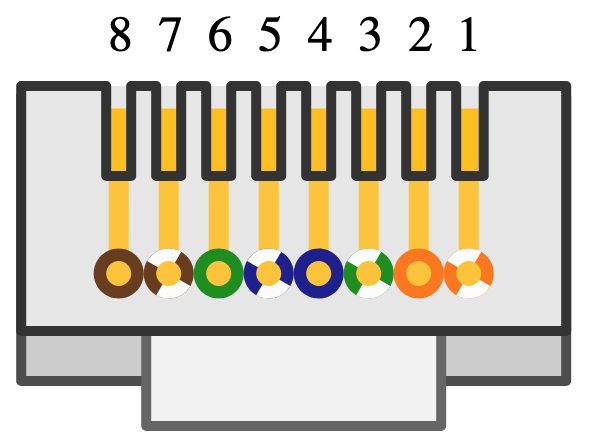
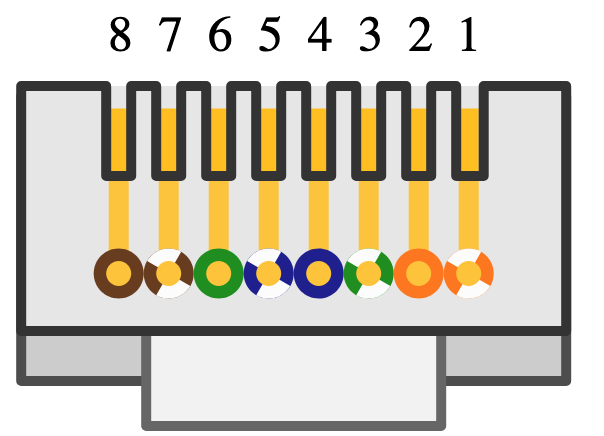
The Sol-Ark BMS RJ45 CAN bus Configurations is shown below.
Plug Pin | Description |
|
4 | Can-H | |
5 | Can-L | |
6 | GND (No Support) |
Was this article helpful?
That’s Great!
Thank you for your feedback
Sorry! We couldn't be helpful
Thank you for your feedback
Feedback sent
We appreciate your effort and will try to fix the article