VERSION HISTORY/CHANGELOG
OVERVIEW
This document provides information on the integration of Rolls S48-100LFP STACK-LV – S48-800LFP STACK-LV ESS with Victron Inverters via CAN bus and RS-485 communication. The integration covers, but is not limited to, the following components.
Refer to www.rollsbattery.com for the most recent version of these documents.
The following guide references instruction from the inverter manufacturer. Always verify these settings against current versions of the manufacturer’s documentation and any additional settings necessary for other system components. Rolls Battery accepts no responsibility for any damage or issues that may occur from the use of this material.
CERTIFICATION INFORMATION



BATTERY CURRENT OPERATING LIMITS
Maximum Battery and ESS Operating Limits
Different system configurations will change the acceptable operating limited. The Energy Storage System (ESS) ESS should not be operated outside these operating limits. The Battery Management System (BMS) BMS will open its internal switch and disconnect the battery in charge and/or discharge if any of these limits are exceeded. Repeated operation outside of posted limits will void your warranty.
Note: Intentional bypassing of a BMS to operate a battery outside its maximum and minimum limits voids warranty and may lead to safety concerns. Refer to the Manual and Label for a full list of operating limits.
Minimum Battery Capacity
Using large solar arrays with ESS that are too small may exceed the operating limits of the ESS which would potentially trigger BMS over-current protection. Battery capacity must be sized to accommodate the maximum charge current of the system, or the charging devices must be adjusted to limit charge output below the operating limit of the installed batteries. This value is determined by summing the charge capacities of all inverter/chargers and solar charge controllers in the system. Additionally, the ESS must be sized with a peak current limit that supports the surge requirements demanded by the DC loads (including inverter). Ensure that the sum of peak currents of all devices on the DC bus is less than or equal to the sum of the ESS peak current values.
*Peak discharge is calculated based on the maximum power output at the inverter normal output voltage, find more details at Victron Overload of Inverters information.
ROLLS S48-100LFP STACK-LV CLOSED LOOP INTEGRATION WITH VICTRON EQUIPMENT
NOTE: Before proceeding, please ensure the S48-100LFP STACK-LV - S48-800LFP STACK-LV internal physical connection steps have been followed as per the S48-100LFP STACK-LV Battery Installation Guide above.
This guide ONLY outlines the setup process when connecting Rolls S48-100LFP STACK-LV batter(ies) with the MultiPlus-II 48/3000/35-50 120V inverter (Firmware 556) following the MultiPlus-II 120V Manual (Rev 12-05/2025). A Victron GX module is required for closed loop integration.
The following steps are physically performed on the system devices or related to their interconnectivity:
Activate the BMS in each S48-100LFP STACK-LV batter(ies) by pressing the on/off button. The screen and RUN light will be on.
Ensure all S48-100LFP STACK-LV batteries are properly interconnected via Link in/out ports and set up properly for DIP switch addresses before connecting the external CAN bus communication connections.
Refer to Appendix B in S48-100LFP STACK-LV Battery Installation Guide.
Connect the battery MODULE 1 CAN port to the VE.Can port on a GX device such as Cerbo-S GX as shown below:
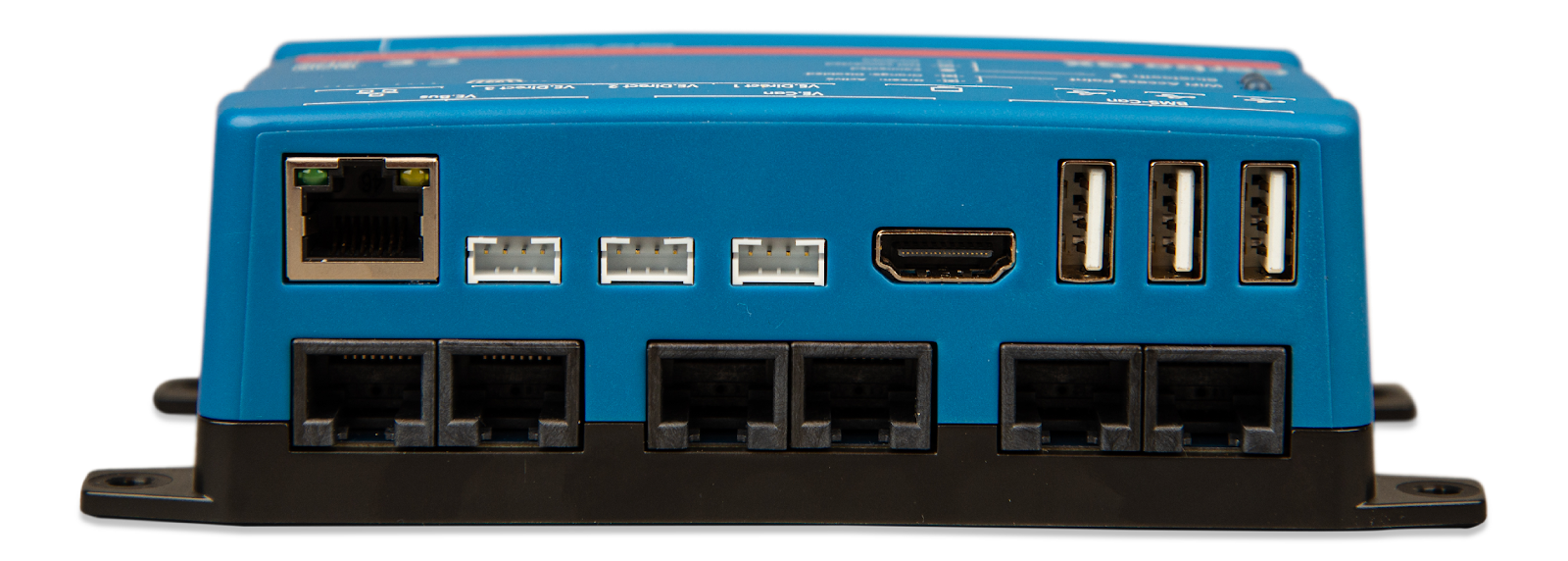
NOTE: For MultiPlus-II GX devices, you can find the VE.Can port on the bottom of the device.
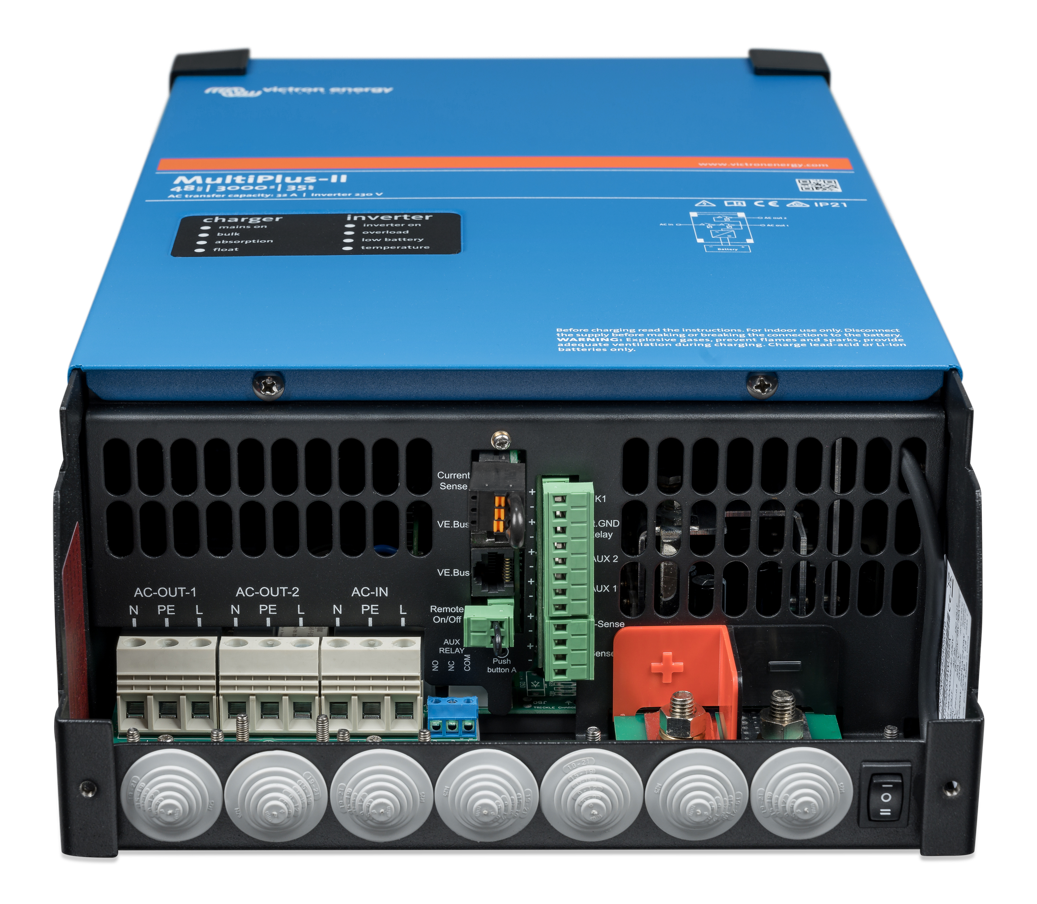
NOTE: MultiPlus-II 48/3000/35-50 120V model shown for reference. For other models, please refer to the applicable Victron installation guide.
NOTE: The EXTERNAL COMM CABLE supplied with the LFP STACK BASE+TOP ASSEMBLY and any other straight ethernet cable is directly compatible with Victron inverter models. For compatibility check with Victron inverters, please reference at CAN COMMUNICATION below.
NOTE: The following setup steps may be performed though the VictronConnect Software interface or the VRM – Remote Management Portal , please follow the VictronConnect manual to setup the control interface before continuing the following process.
There are several ways to control Victron Systems remotely, including via VRM as detailed here: Open up Victron Connect Software/App → Select VRM Tab → Logon to VRM online portal → Select Remote Console.
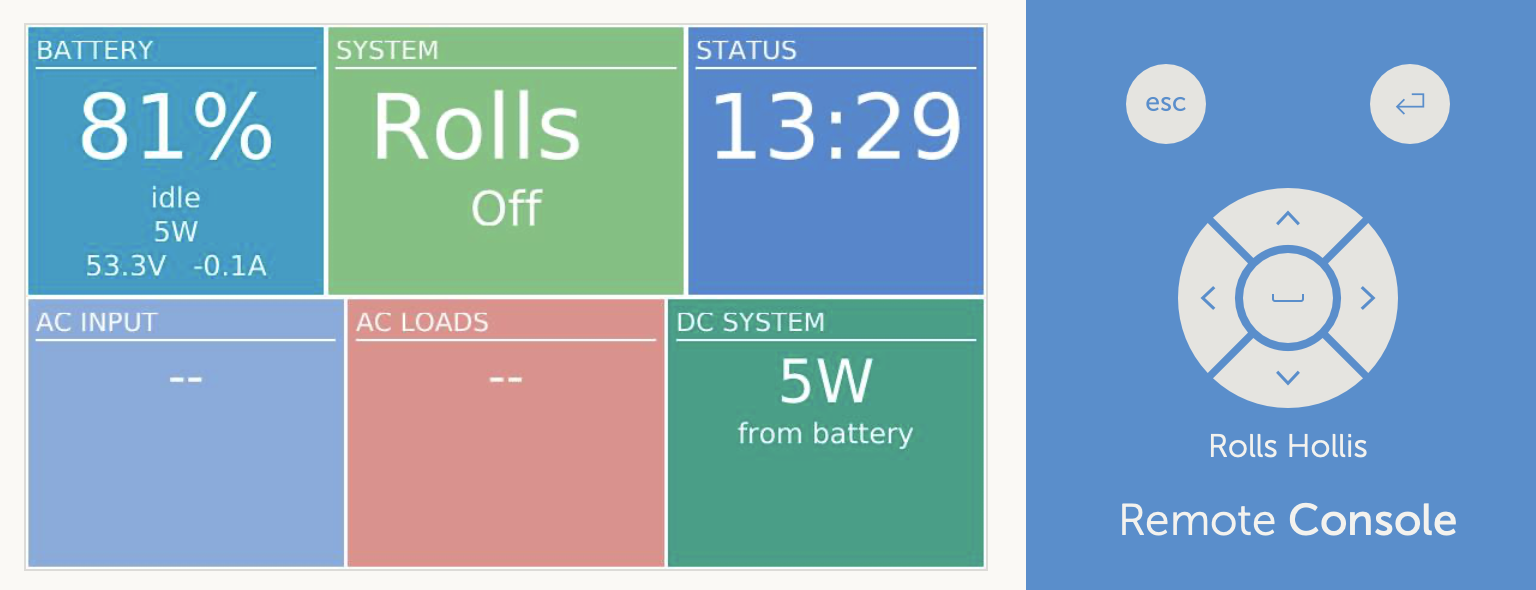
Click on the Return button to go to the Device List Page.
Select Settings → Services → VE.Can port → CANbus Profile.
Change CANbus Profile to CAN-bus BMS LV (500 kbit/s) as shown:
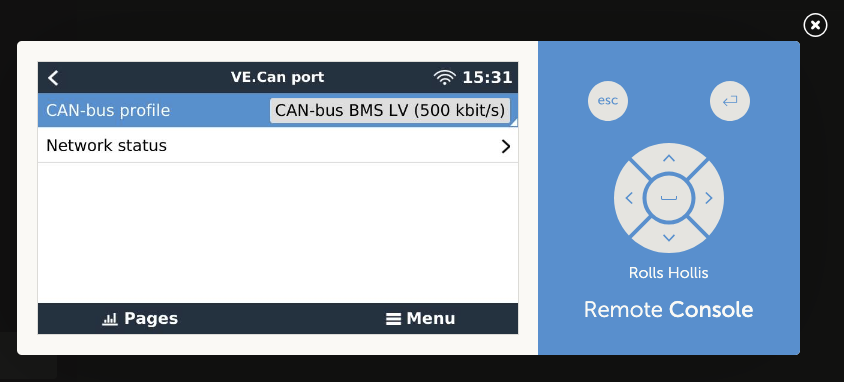
Select Network status → packets should be coming through as shown:
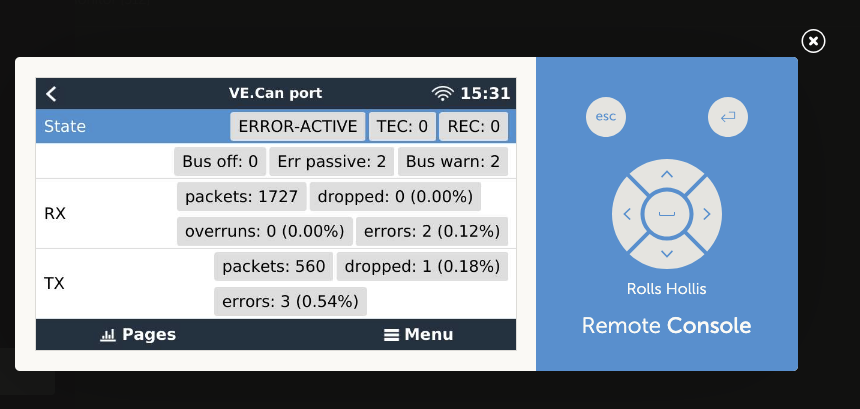
Click Return button to go back to the Device List Page.
5. Rename storage Device under Name
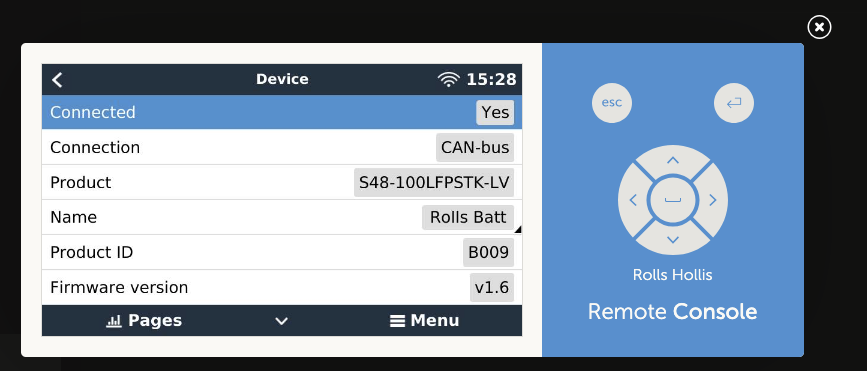
Find battery listed above inverter → Select Battery → Device → Name → Rename to preferred name.
Click Return button to go back to the Device List Page.
Ensure battery operational parameters were properly read off from the BMS
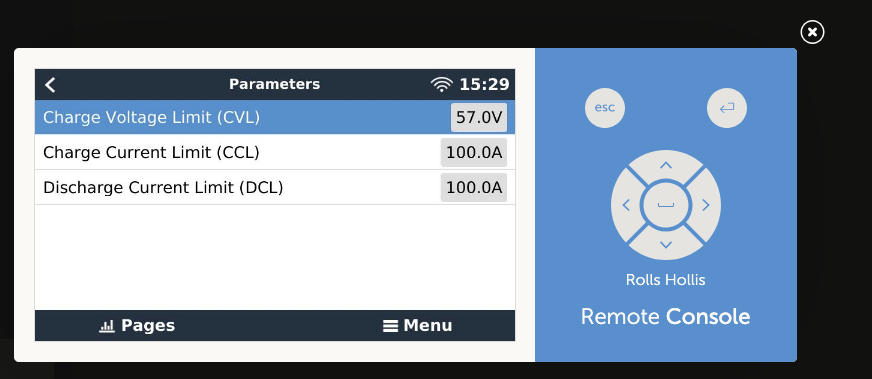
Select Battery Name → Parameters → check the following parameters.
Parameters show on the screen should match with the summarized table:
Table 1: CVL, CCL, DCL Setpoints for Victron DVCC Systems. (Data is truncated to exclude transient conditions).
Click Return button to go back to the Device List Page.
[OPTIONAL] Limit Charge Profile (skip this step is you don’t wish to limit the charge profile).
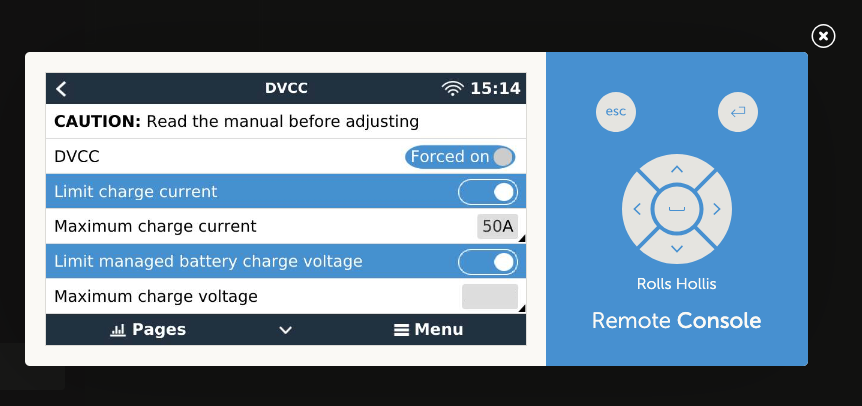
Select Settings → DVCC.
Turn on Maximum charge current → set the limit to your desired value.
Note: Limiting to a charge current of 0.5C provides a good balance of performance and lifespan. You may skip this step if you don’t wish to limit the charge current.
Turn on Limit managed battery charge voltage → set the limit to your desired value
Note: If issues occur with battery balancing, reducing the charge voltage between 55.0-57.0V may help.
Click Return button until go back to the Main Page.
After a few minutes, the DVCC entry within the DVCC page should automatically be switched on.
If it is not, please ensure proper setpoints are being transmitted as in Table 1. If so, you can enable DVCC by selecting the toggle switch.
The inverter setup process is now complete.
CAN COMMUNICATION
S48-100LFP STACK-LV CAN pinout is shown below.
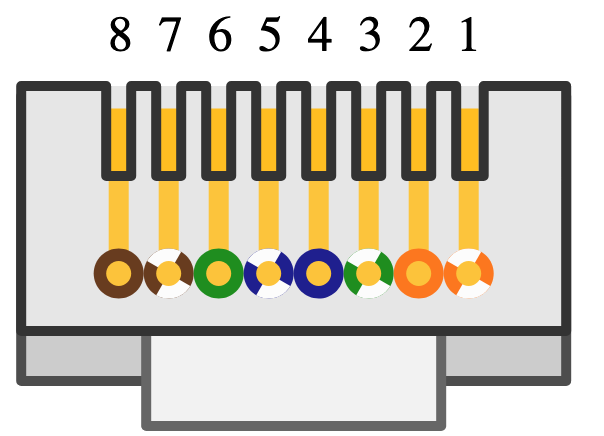
Note: The CAN bus pinout above enables connection to a Victron inverter using a normal (“straight”) ethernet cable.
Victron inverter VE.Can port configuration is shown below.
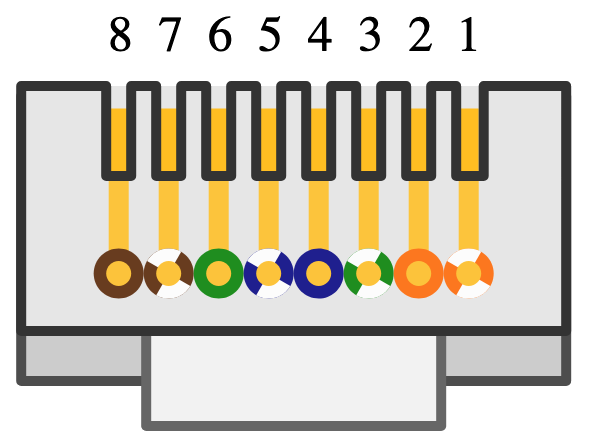
ROLLS S48-100LFP STACK-LV OPEN LOOP INTEGRATION WITH VICTRON ENERGY EQUIPMENT
Important Notice – Communication Configuration Impacts Performance Warranty
We highly recommend configuring your battery and inverter in closed-loop mode as your primary option. Closed-loop operation ensures optimal performance, enhances safety through real-time communication between the battery and inverter, and maximizes the lifespan of your battery system.
Use of an open-loop configuration poses unnecessary risks, including potential overcharge/over-discharge conditions, reduced efficiency, and lack of coordinated fault protection. Please be aware that operating in open-loop mode will impact your performance warranty eligibility.
Was this article helpful?
That’s Great!
Thank you for your feedback
Sorry! We couldn't be helpful
Thank you for your feedback
Feedback sent
We appreciate your effort and will try to fix the article